Beginner woodworking plans · Cut Planner · Boards, not sheets

Four 24-inch shelves from one 8-foot board? Count the saw cuts first.

On a board exactly 96 inches long, with a 1/8-inch blade, three cuts turn 3/8 of an inch into sawdust, and the fourth shelf comes out at 23-5/8 inches.

Kerfnote is 24 beginner plans, none of them needing a table saw, with a Cut Planner that lays your parts out on the boards your store sells, kerf included. It tells you before you shop if you need one more board.

Screen recording of the Cut Planner on one of the 24 plans, the Two-Tier Shoe Rack, with sample boards. On-screen captions, no narration.

Delivered by email: 24 PDF plans and two web tools · 30-Day Money-Back Guarantee

The lesson: one board, four shelves

Take an 8-foot 1×4 that measures exactly 96 inches, and a cut list that calls for four shelves at 24 inches each.

On paper, 4 × 24 = 96. The shelves fit with nothing to spare.

At the saw, every cut removes a strip of wood as wide as the blade. That strip is the kerf. On a typical circular-saw or miter-saw blade it's about 1/8 inch; thin-kerf blades take a little less.

Four shelves out of one board take three cuts. Here's the math with the saw in it:

Board       96″
Shelves     4 × 24″ = 96″
Saw cuts    3 × 1/8″ = 3/8″
Shelf 4     24″ − 3/8″ = 23-5/8″

The first three shelves come out at 24 inches. The fourth comes out at 23-5/8.
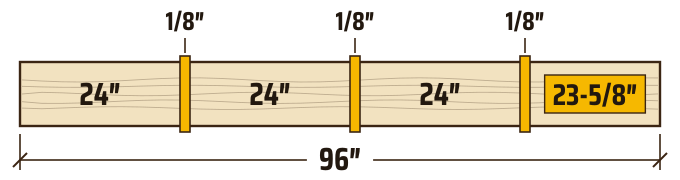
A 96-inch board with four 24-inch shelves marked and three saw cuts between them; the fourth shelf is 3/8 inch short

Illustration, not to scale: the saw cuts are drawn wider so you can see them.

In this example, nothing was measured wrong. The tape was right, the marks were right, and the cut list was right. The math just never counted the saw.

A board sold as 8 feet can measure a little more than 96 inches, and blades differ. So measure the board you're buying and check your blade. That's why the Cut Planner asks for the real length of each board and the kerf of your blade, with 1/8 inch filled in to start.
What the cut list leaves to you

A cut list says which parts to cut and how long each one is. Even when it says which board a part comes from, it's drawn for the boards the plan assumed, not the ones on the rack at your store.

Without a plan for that, the board-by-board math happens in the lumber aisle, or at the saw with the board already on the sawhorses. That's where the 3/8 inch shows up, and where the second trip to the store starts.

So the math moves to before you buy, with the boards your store actually sells.

Kerf-Aware Layout

Kerf-Aware Layout is how the Cut Planner works: the kerf is in the math from the first board to the last.

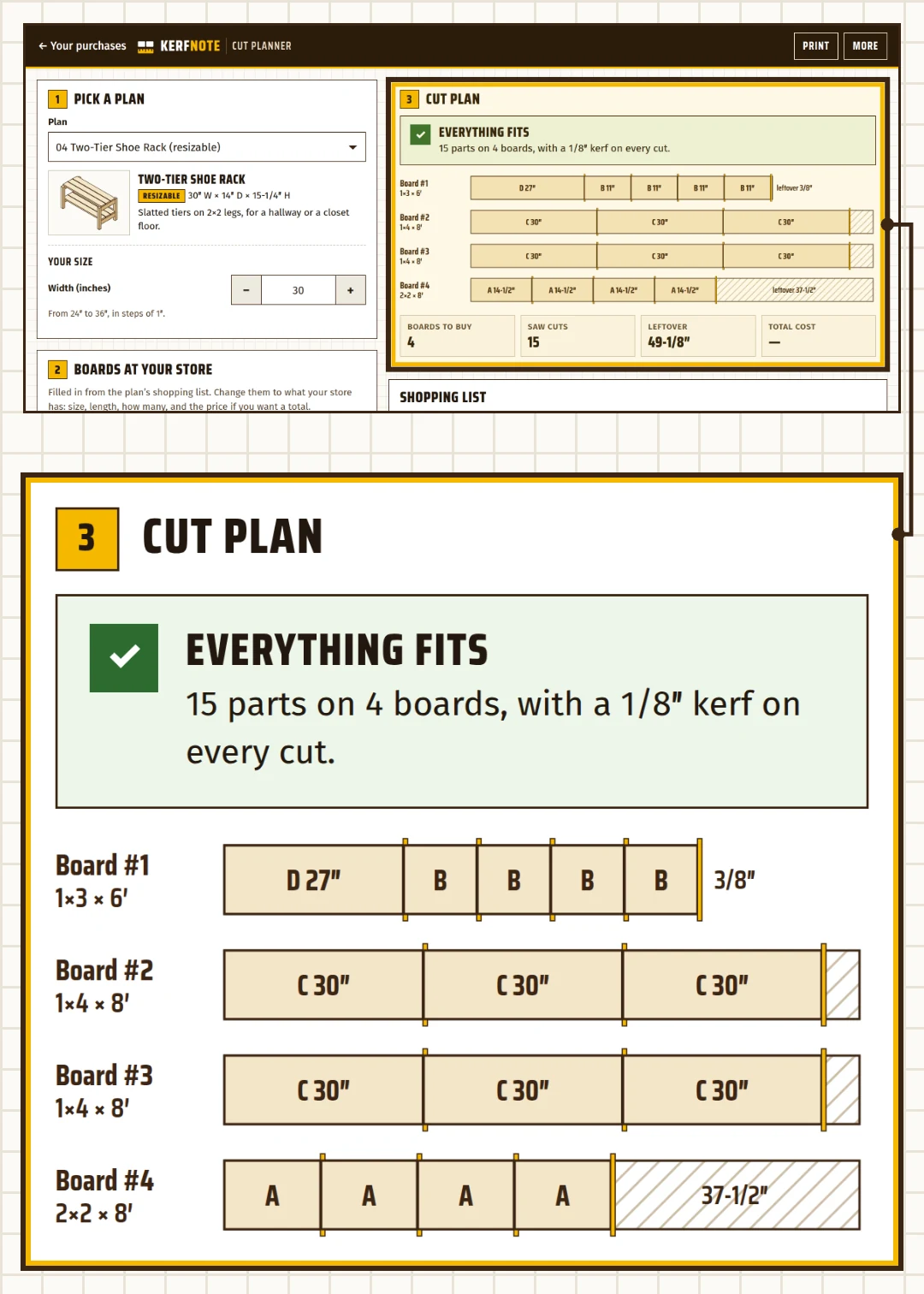
The Cut Planner with the Two-Tier Shoe Rack: each part laid out on its board, with the kerf and the leftover marked
  1. Pick a plan. Choose one of the 24, and its cut list loads into the planner. Building something of your own? Type in your own cut list.
  2. Enter the boards your store sells. The board list starts with the plan's shopping list. Change the size (like 1×4 or 2×6), the length and how many, and add the price of each board if you want a total. Set your blade's kerf, or keep 1/8 inch.
  3. See the cuts before you buy. The cut plan redraws as you type: each board to scale, with its parts, every saw cut and the leftover, plus the boards to buy, the number of cuts and, with prices, the total cost. If some parts have no board, it says so ("One board short"), names those parts, and offers a button that adds one more board of that size and length. When making one part an inch or less shorter would fit everything, it also tells you which part and by how much.

Print the shopping list and the cut plan, and take them to the store.

In the store, the 8-foot 1×4s are gone and only 10-foot ones are left? Change the length on your phone. The layout redraws, and the shopping list changes with it. A plan you set up on your computer goes to your phone with a link the planner makes.

The Cut Planner plans cuts to length on boards. It doesn't lay out plywood or MDF sheets.

Ten plans resize to your space

Ten of the 24 plans change size within a range printed on the plan, one or two measurements each. Change the size in the Cut Planner, and the drawing, the cut list and the shopping list are redone to match. Ask for a size outside the range, and the planner says so and keeps the last size that was in range.

One plan, all of it

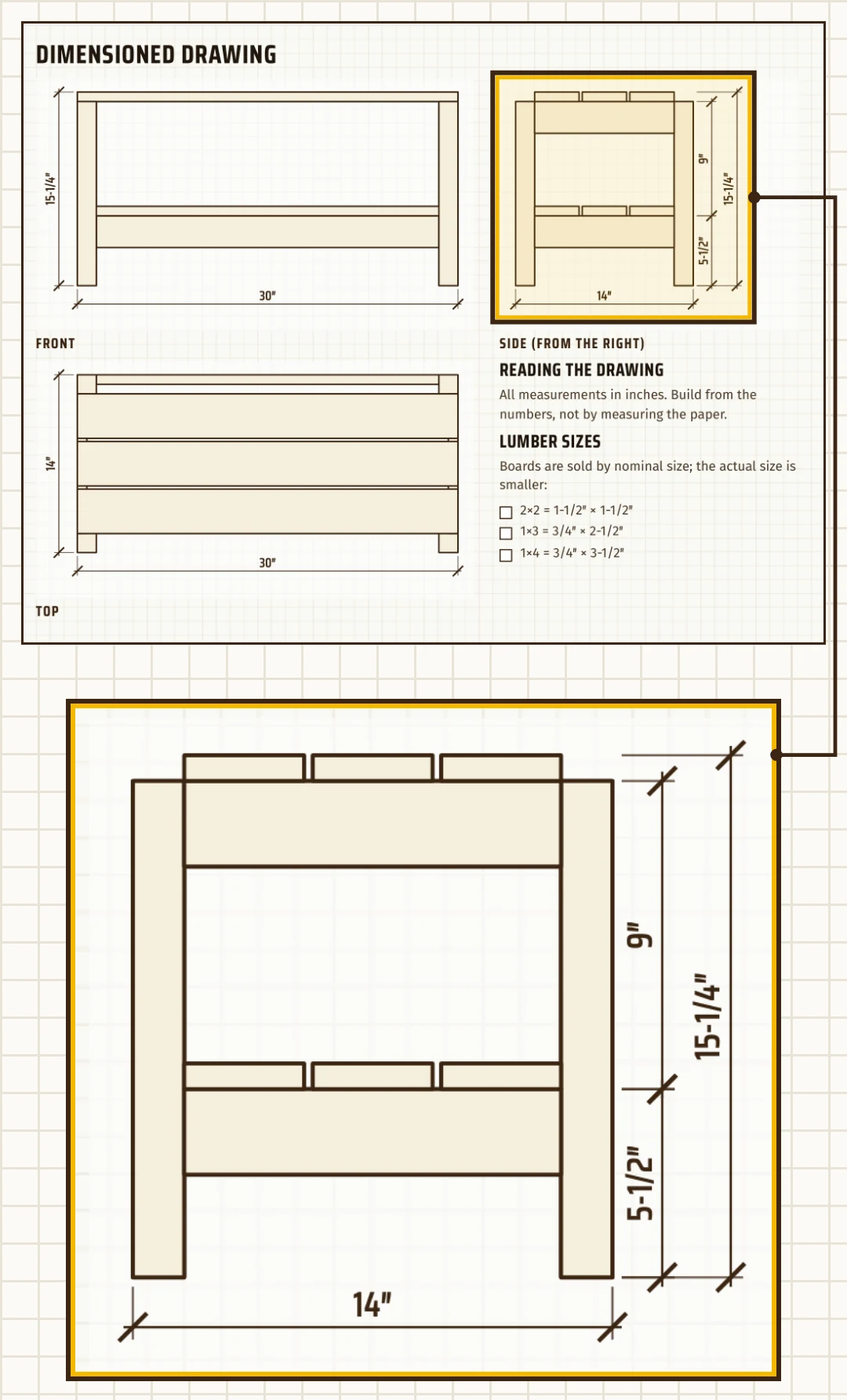
Here's one of the 24 plans, the Two-Tier Shoe Rack, as you'll download it, and the cut plan the Cut Planner prints for it.

Two-Tier Shoe Rack: the dimensioned drawing, with front, side and top views
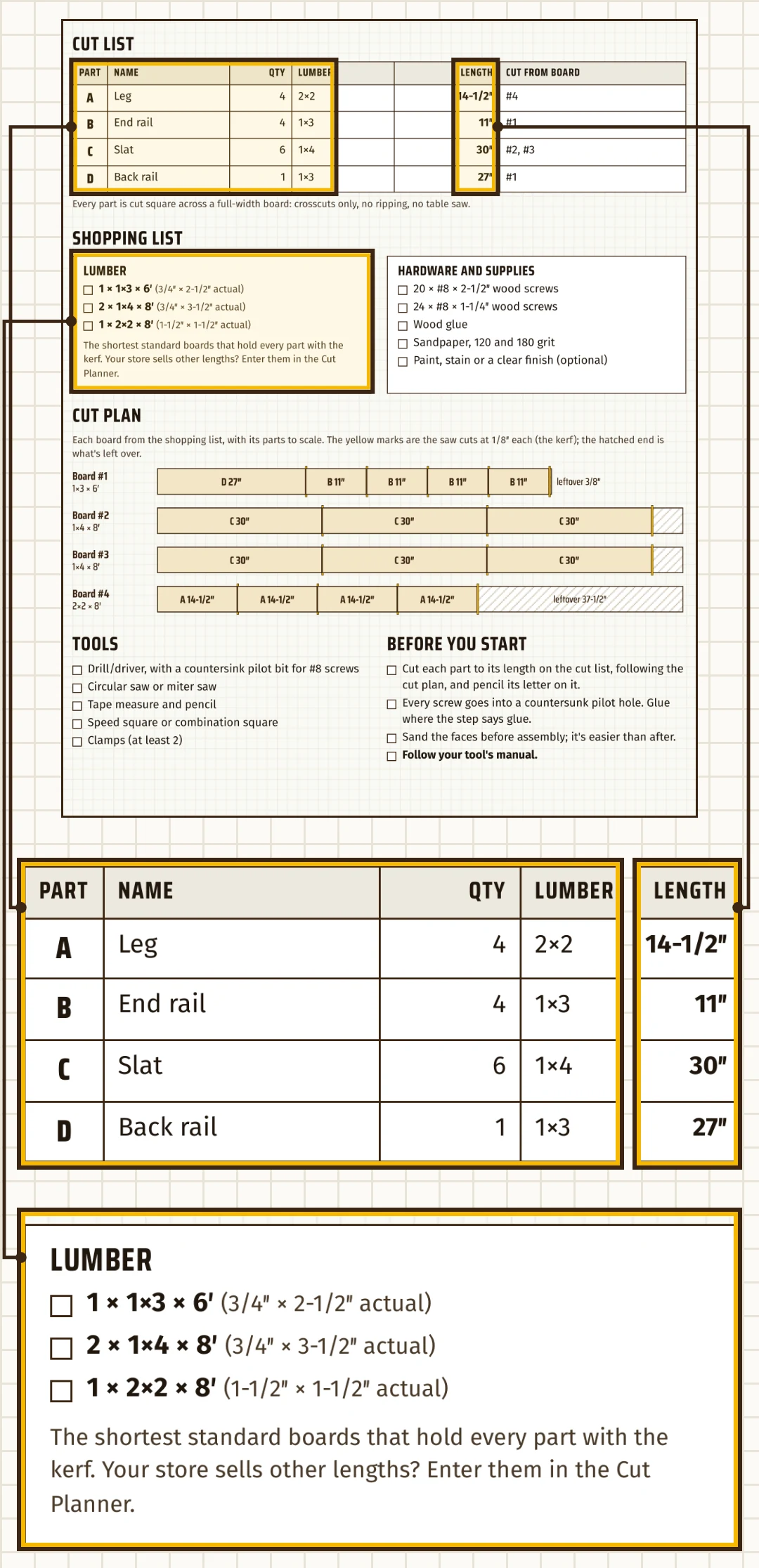
Two-Tier Shoe Rack: the cut list, the shopping list, the cut plan, the tools and the notes before you start
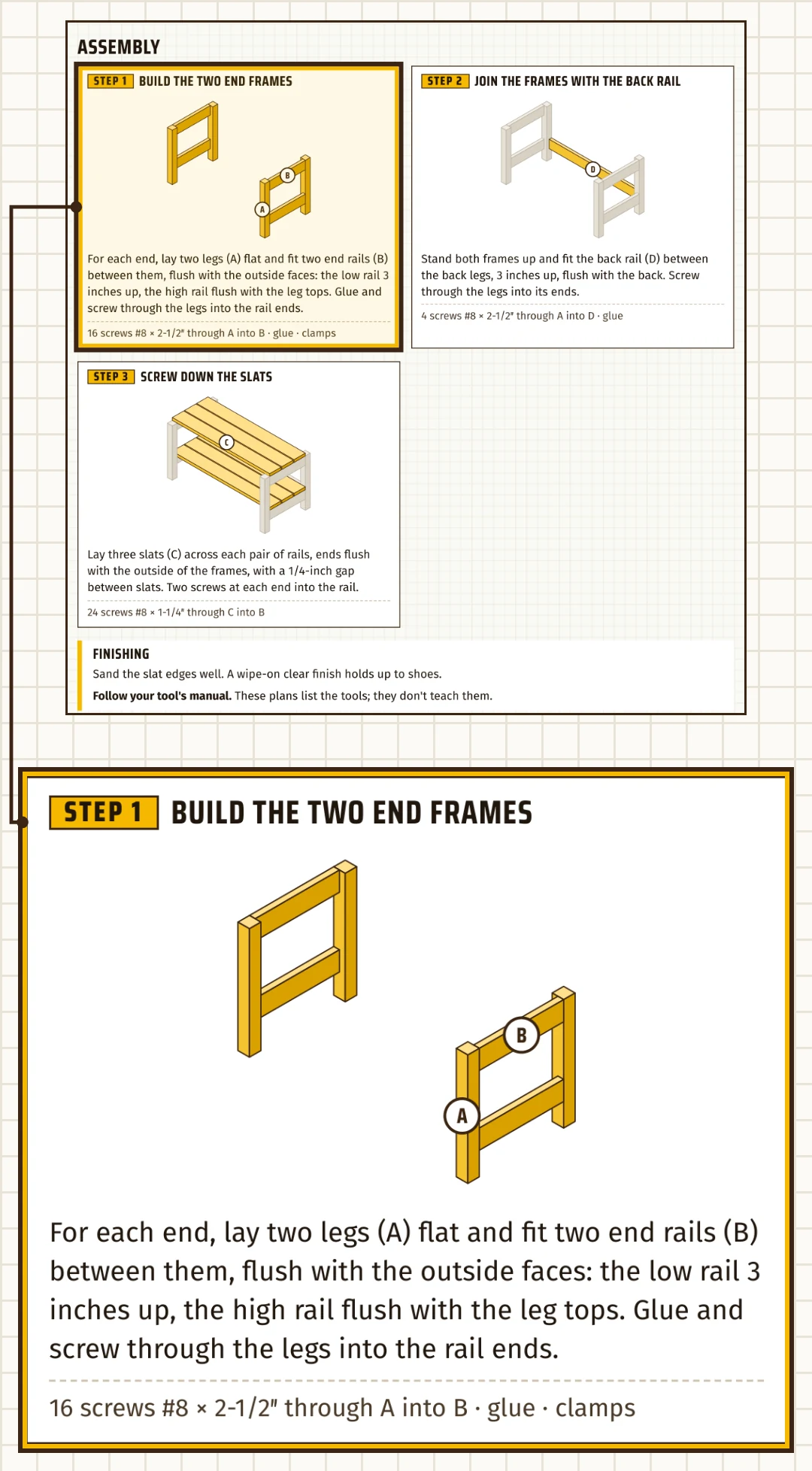
Two-Tier Shoe Rack: three assembly steps, each with a drawing of the parts that go in, and the finishing
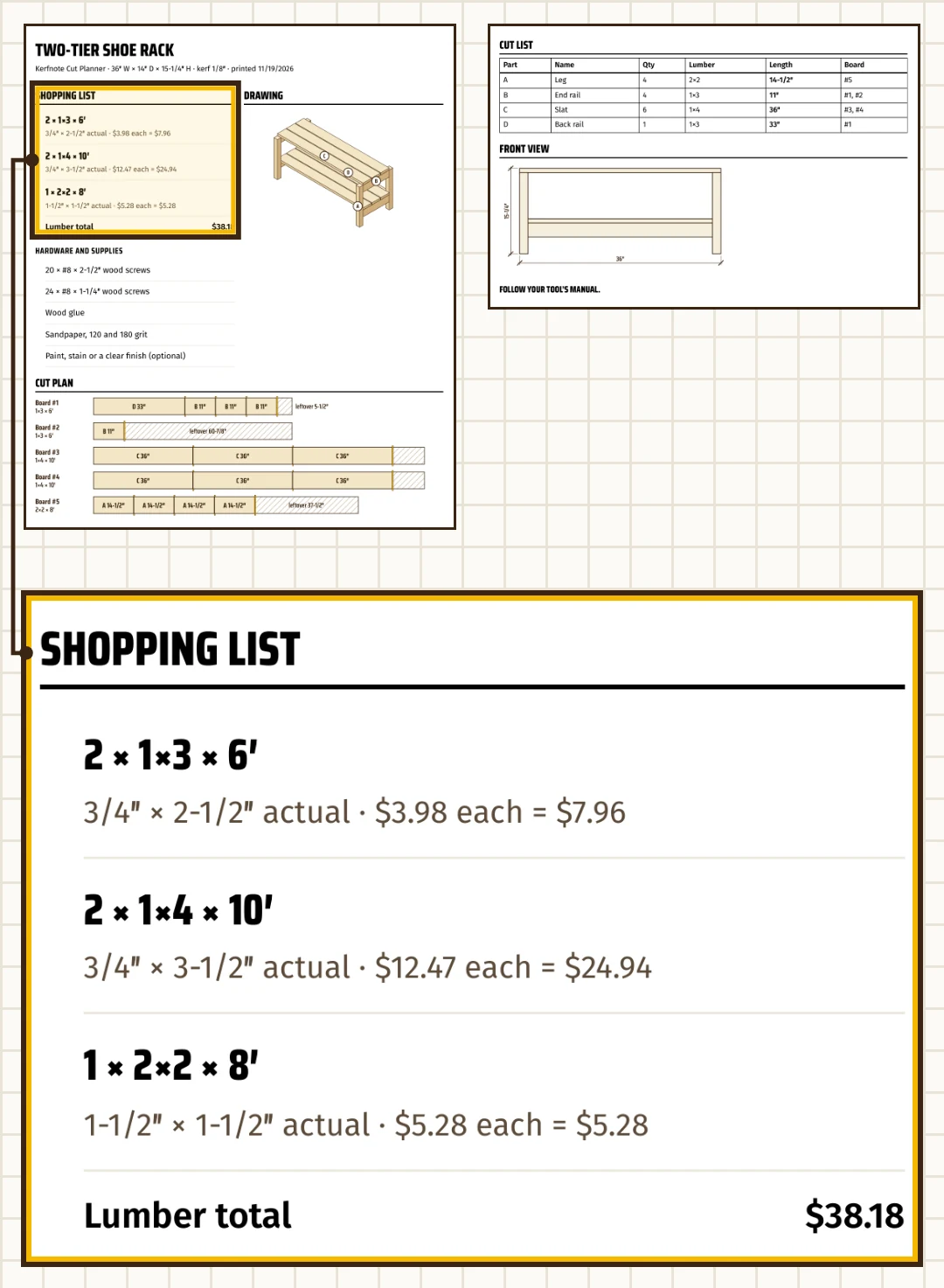
The Cut Planner's printout for the same plan: the shopping list, the drawing, the cut plan and the cut list

Every plan says it, and so do we: follow your tool's manual.

How the plans are checked

By code, before the PDFs are made. Each plan is built as a 3D model, piece by piece, and a script checks it: every part on the drawing is on the cut list at the same size; no part overlaps another or floats loose; every board on the cut plan holds its parts with the kerf, and the shopping list has exactly those boards; every screw joins two parts that touch and doesn't come out the other side, and the screw count on the shopping list is the sum of the steps.

The script ran on the 24 plans at their drawn size and on the ten resizable ones across their ranges, ends included: 784 sizes, 0 failures. Then every line of each plan's cut list, lumber and screws was read from the PDF and compared with the same model. And to see that the script catches mistakes, it was run on a plan broken on purpose five ways. It flagged all five.

What the check covers is the numbers. It isn't a shop build: the plans weren't built and tested in a workshop. The build is yours, with the tools each plan lists.

Measure Twice

Run a cut list on the boards your store sells. If Kerfnote isn't for your shop, email us within 30 days for a full refund.

30-Day Money-Back Guarantee. Email support@kerfnote.store within 30 days of your purchase, and we refund the full price of that purchase. You don't have to give a reason.

Auryon369, our merchant of record, or Kerfnote puts the refund back on the card you paid with.

Bill of materials

The 24 plans

8 shelf projects, 4 benches, 5 planter boxes, 5 crates, a two-step stool and a workbench: 16 for inside the house and 8 for the yard.

None of the 24 needs a table saw. Every plan lists its own tools. The plans are drawn for these:

Shop check

In range

Out of range

Kerfnote: 24 Beginner Plans + Cut Planner

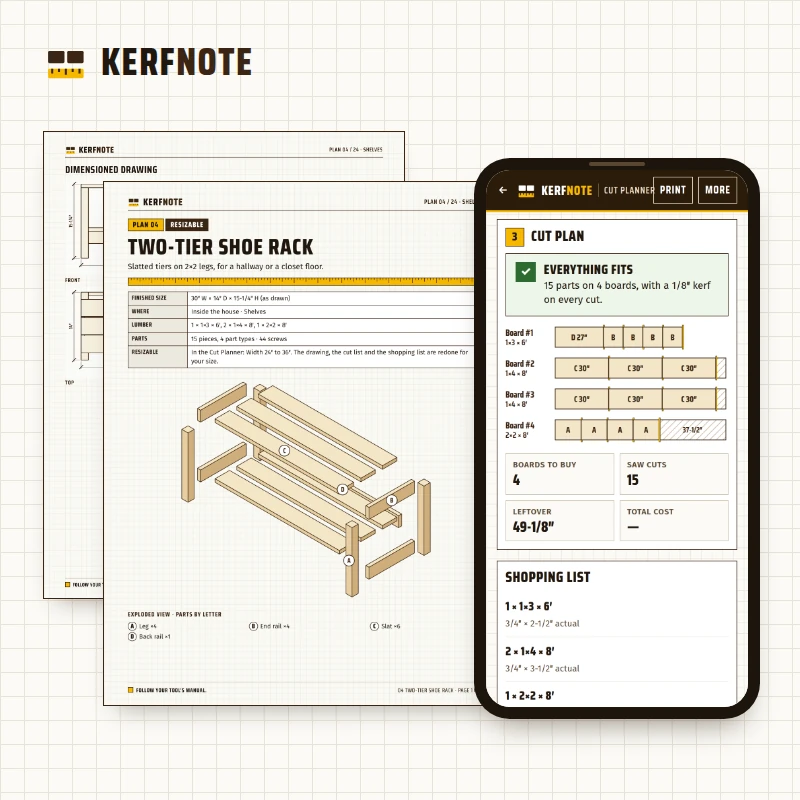
Kerfnote: 24 Beginner Plans + Cut Planner, a plan's drawing page next to the Cut Planner on a phone

Kerfnote: 24 Beginner Plans + Cut Planner — $47 USD, one-time payment

  • 24 beginner plans (PDF), none needing a table saw
  • The Cut Planner, kerf included
  • Ten resizable plans
  • Board-foot calculator
  • Email support

One-time payment. No subscription. Access by email after purchase; the files you download are yours to keep.

Pick a plan, enter the boards your store sells, and see the cuts before you buy.

30-Day Money-Back Guarantee. Email support@kerfnote.store within 30 days of your purchase, and we refund the full price of that purchase. You don't have to give a reason.

Questions

Do I need a table saw?

No. None of the 24 plans uses one. Each plan lists its own tools.

Does the Cut Planner do plywood or MDF sheets?

No. It plans cuts to length on boards. Laying out sheets is a different problem, and this tool doesn't do it.

My store sells 10-foot boards, not 8-foot ones.

Enter the lengths you find. The planner works from what you type, and the shopping list follows.

What if my board isn't exactly the length on the tag?

Measure it and enter the real length. The planner counts what you give it, so a wrong length gives a wrong layout.

I already have free plans and a free cut optimizer. What does Kerfnote add?

Those two work together if you copy each plan's parts into the optimizer yourself. Kerfnote connects them: the cut lists of all 24 plans are already loaded into the planner, every plan comes with its shopping list, and on the ten resizable plans the cut list changes with the size you set.

Were the plans built and tested in a shop?

No. They're checked by code: drawing, cut list, cut plan, shopping list and screws, part by part, with 0 failures. The check covers the numbers, not the build.

Will anything arrive in the mail?

No. The plans are PDFs to print or read on a screen, and the two web tools open from your access page.

What do I need to open it?

A PDF reader for the plans, and a web browser on a phone or a computer for the Cut Planner and the board-foot calculator. Nothing to install. What you enter stays in that browser, on that device; the planner can export a backup file and make a link that opens a plan on another device.

Can you help me with a joint or a technique?

Support covers your access, the files and the planner. It isn't woodworking coaching. Each plan's steps are written for the tools it lists, and your tool's manual comes first.

Is $47 the whole cost?

For Kerfnote, yes: $47 USD, charged once, with no subscription. The lumber, screws and finish are yours to buy, and each plan's shopping list counts them.

What if Kerfnote doesn't suit my shop?

30-Day Money-Back Guarantee. Email support@kerfnote.store within 30 days of your purchase, and we refund the full price of that purchase. You don't have to give a reason.

Before your next trip to the lumber yard

You know the lesson now: count the saw cuts before you count the boards. Kerfnote does that count for each of the 24 plans, on the boards your store sells, and gives you the shopping list and the cut plan to take with you.

Pick a plan, enter the boards your store sells, and see the cuts before you buy.